Morelia: A Fun Display Font for Creative Campaigns
It’s 9 PM on a Thursday, and I’m finalizing the visual assets for a seasonal sale launch. The client wants something lively, approachable, and memorable. I’ve tried a few options, but nothing quite clicks. Then I remember: Morelia. A brush-pen-inspired display font that feels both clean and a little quirky. It’s the kind of typeface that makes you want to lean in and take notice.
Morelia’s Visual Style and Personality
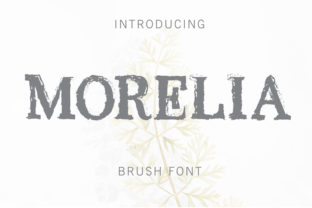
Morelia has a casual, hand-drawn vibe that’s easy to love. It’s not overly ornate or complicated, but it carries a sense of playfulness that can elevate any design. The strokes are smooth, with subtle variations that mimic real brushwork. This gives it a human touch, making it feel less rigid than many other display fonts. It’s ideal for projects that need a bit of personality without sacrificing clarity.
When used in headlines, Morelia adds a sense of energy and warmth. It works well for brand names, taglines, and promotional messaging where a friendly tone is desired. Its structure is open enough to maintain readability, even at smaller sizes, which is crucial when designing for social media thumbnails or mobile previews.
Using Morelia in Real Campaigns
I recently used Morelia for a product teaser campaign on Instagram. The goal was to create a series of posts that felt cohesive yet visually engaging. By applying Morelia to the headline text and callout elements, the designs stood out in the feed without overwhelming the viewer. The font’s slight irregularity made each post feel unique, while still maintaining a unified look across the series.
For a YouTube thumbnail, Morelia helped emphasize the key message quickly. On a small preview, the font’s legibility was strong, and its distinctive shape made the thumbnail more eye-catching. It also paired well with bold colors and dynamic imagery, creating a balanced composition that drew attention without being distracting.
Best Use Cases for Morelia
Morelia excels in short, impactful text. It’s perfect for headlines, logos, and decorative titles. If you’re designing a webinar banner, an online course launch, or a content series title, Morelia can add a creative flair that sets your work apart. It also works great as a supporting typography in editorial layouts or packaging design, where a bit of character can make a big difference.
However, it’s not the best choice for long paragraphs or dense information. In those cases, a clean sans serif or serif font would be more appropriate. Morelia shines when used strategically—never as the main body text, but as a standout element that reinforces your brand’s voice.
Readability Tips for Digital Campaigns
When using Morelia in digital campaigns, keep a few things in mind. On mobile screens, ensure the font size is large enough to remain legible. For thumbnails or image overlays, avoid placing it over busy backgrounds. A solid color or subtle gradient can help the text pop without competing with the visuals.
On dark backgrounds, Morelia retains good contrast, but you may need to adjust the weight slightly for optimal visibility. For light backgrounds, the font’s natural sharpness ensures clarity. In fast-scrolling feeds, using Morelia for headers or labels can help users recognize your content quickly and remember it better.
Font Pairing and Design Considerations
Pairing Morelia with a clean sans serif like Montserrat or Poppins creates a modern, balanced look. For a more traditional feel, combining it with a serif font like Lora or Playfair Display can add sophistication. If you’re going for a handwritten aesthetic, a script font like Great Vibes or Dancing Script can complement Morelia’s style effectively.
Before integrating Morelia into your project, check the available styles, alternates, and ligatures. These features can enhance the font’s versatility, especially when working on branded templates or multi-platform campaigns. Also, verify multilingual support and commercial licensing to ensure it meets your project’s needs.
Morelia isn’t just a font—it’s a tool for storytelling. Whether you’re designing a social media graphic, a YouTube thumbnail, or a promotional email, it brings a sense of fun and creativity that can make your campaign more engaging. With its clean yet quirky nature, it’s a valuable addition to any designer’s toolkit.